There is no universal best free product-ad video tool. The practical choice depends on your approved assets, required workflow, and current account-level terms for model access, credits, exports, watermarks, and commercial use. This documentation-based comparison draws on publicly described workflows and official plan pages; it does not report hands-on output testing.

What Makes an AI Video Generator Good for Product Ads (Not Just Generic Video)
Product-First Creation
A strong product-ad generator starts with real product assets, not a generic text prompt. Flova can turn one product image into multi-angle references while keeping the product’s proportions, colors, logo, materials, and packaging consistent across the creative.
Ad Structure Built for Conversion
Product ads need a clear hook, product benefit, demonstration, and next step. Template-led workflows help creators organize these elements quickly, while Flova’s staged process connects product references, storyboards, keyframes, motion, and final editing in one workflow.
Placement-Ready Formats
Choose the ad placement before setting the canvas. Vertical 9:16 works well for TikTok and Reels, while square and horizontal formats suit feeds, websites, and other campaign placements.
Reusable Product-Ad Templates
Templates speed up production by giving creators a ready-made structure for the hook, product demonstration, benefits, and CTA. Flova’s commerce templates make it easier to adapt that structure to different products and campaign formats.
Pacing and Creative Control
Good ad pacing captures attention early without making the product demonstration difficult to follow. Scene timing, transitions, camera movement, keyframes, and audio should work together to keep the product and message clear.
A product-ad AI video generator can be evaluated against these four criteria:
- Product-image input: It can accept approved product images or other verified product references as a starting point.
- Placement-aware sizing: It supports formats suited to vertical, square, and horizontal ad placements.
- Structured assembly: It provides templates or an editing path for a hook, product message, and clear next step.
- Controllable pacing and review: It gives creators control over scene timing, motion, product presentation, and the final sequence.
Together, these criteria help creators produce product ads that are faster to assemble, easier to adapt, and clearer for viewers.
Key Features to Look For in a Free AI Product Ad Generator
A free or free-to-start product-ad workflow is easier to assess when these six practical features are checked individually. Availability can vary by account, region, model, asset, and plan, so verify the current product interface before committing to a campaign.
1. Ad Templates
Templates can reduce layout work by providing a starting structure for a headline, product shot, and next step. Flova offers free product-video templates that users can customize, although an individual design may still contain Pro content that requires licensing or removal. A template aids assembly; it is not evidence that an ad or its claims are effective.
2. Product Image-to-Video
Image-to-video turns a static product photo into motion-led creative. Flova builds multi-angle product references from one image, then carries them into storyboards, keyframes, animated shots, and a complete promotional sequence; InVideo and VEED also support product-image animation workflows.
3. AI Voiceover
AI voice tools can turn a supplied script into narration. InVideo says its AI voice tool creates a voiceover from a script, while its free-plan FAQ says voice generation consumes capped AI credits. Confirm that the feature is available in the intended account, and verify spoken product claims against approved copy.
4. Aspect-Ratio Presets
Useful presets include vertical, square, and horizontal formats, but placement—not software alone—determines what is suitable. Canva’s resizer lists 16:9, 9:16, and 1:1, while automatic Magic Switch resizing is a premium feature. TikTok, Meta, Google, and Amazon each publish product- and placement-specific specifications that can change.
5. Brand Kit
A brand kit can hold approved visual references for repeatable assembly. Canva Free currently includes one Brand Kit limited to three colors; this should not be confused with the fuller Pro Brand Kit or Brand Templates. Keep logos, colors, fonts, product facts, and approved copy in a separate review set even when a tool has brand controls.
6. Export and Download Flexibility
Check export treatment before approving the creative. Relevant terms can include resolution, a tool watermark, eligible asset licenses, file duration, credit consumption, and commercial-use conditions. For example, Canva Free can export without a watermark when a design uses only Free content, while VEED says Free-plan exports carry a VEED.IO watermark. These terms are product-specific and subject to change.
How We Evaluated These Free AI Video Ad Tools
This comparison uses a documented desk-review methodology, not first-person generation tests or qualitative rankings. It compares public provider documentation with current official plan information and treats plan terms as time-sensitive.

The review followed these four steps:
- Input path: Identify each provider’s documented starting inputs, such as a product image, verified text, a script, or a prompt.
- Workflow path: Identify the documented generation, template, reference, and editing options relevant to a product-ad workflow.
- Placement and review path: Check whether the provider documents relevant aspect-ratio or export controls, then compare the intended file with the current placement specification.
- Plan and rights path: Check the official account, plan, and terms pages for current credits, watermark treatment, resolution, model access, and commercial-use conditions.
The comparison does not treat a provider’s marketing description as proof of product fidelity, legal compliance, performance, or advertising approval. A provider workflow may warrant evaluation, but the advertiser must review the output, secure necessary rights, and substantiate objective claims.
Best Free AI Video Generators for Product Ads in 2026: Comparison Table
Use this quick comparison to match each tool with the product-ad workflow you need.
For the fastest route from a product image to a structured multi-shot ad, Flova offers the most complete product-focused workflow in this comparison.
The Top Free AI Product Ad Generators, Reviewed
The following five sections describe documented workflows, not output-quality rankings or hands-on verdicts.
1. Flova.ai — Product-Image Promotional Workflow
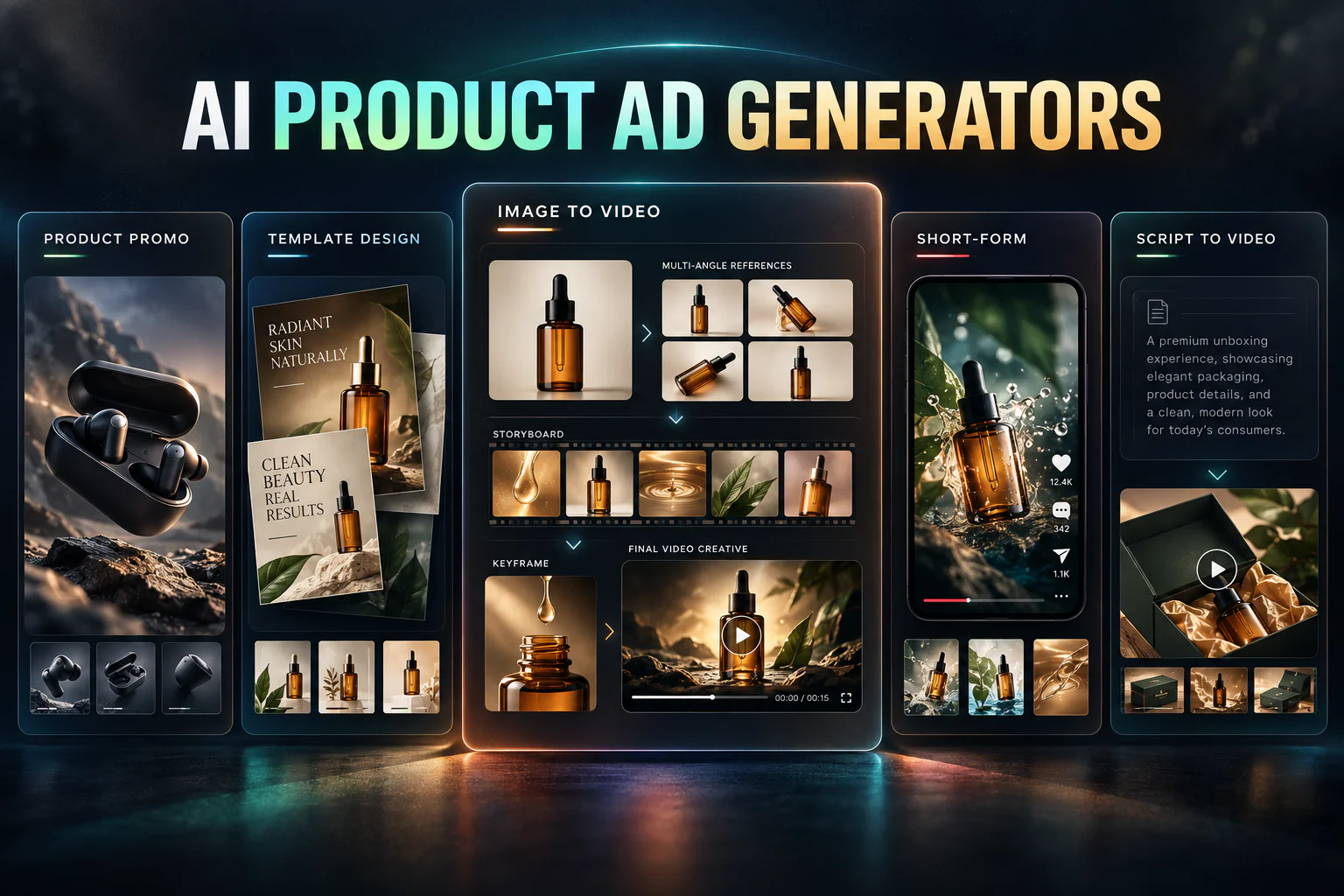
Flova’s product-images multi-shot guide describes a workflow that can begin with one uploaded product image. The user supplies verified brand and product details, reviews a multi-angle product reference, then proceeds through storyboard, keyframe, motion, and multi-shot production stages. Flova also documents platform-level uploaded text, image, video, and audio references; available reference mode and charge depend on the selected model and settings.
Flova currently advertises a sign-up offer of 300 credits: 100 credited immediately and 200 creation-bonus credits. Credits pay for generation and vary by model and settings. Its plan information lists Free at 720p and paid tiers at 720p/1080p; it also says commercial use is available when the subscription plan explicitly includes it, with Starter, Basic, and Pro listed for commercial licensing rather than Free. Confirm the live account’s credits, watermark treatment, resolution, and plan rights before production.
2. Canva — Brand-Consistent Social Ad Templates
Canva offers a Free plan currently listed in US pricing at US$0/year for one person. The plan includes one Brand Kit limited to three colors, a shared monthly allowance of up to 20 Standard or Premium AI uses, and access to free product-video templates. Image-to-video is listed as a Free-included Premium AI feature within that shared allowance; Canva AI’s Create a Video Clip is an Ultra AI feature unavailable on Free.
Canva may suit workflows centered on approved static assets, reusable layouts, and manual copy control. Free content can be exported without a watermark, but a design containing Pro or premium content is watermarked until that content is licensed or removed. Users remain responsible for reviewing AI output and securing the permissions and compliance required for the intended use.
3. Runway — Image-to-Video Workflow
Runway documents image-to-video generation. Its Gen-4.5 guide describes an image-plus-text-prompt workflow, but Gen-4.5 requires Standard or higher; Free model availability changes and should be checked after login. Runway’s general guidance describes generative video at 720p and offers an option to upscale completed output to 4K, without making that a universal Free-plan export entitlement.
Runway Free includes 125 one-time credits that do not expire, a limited and changing tool selection, and 5 GB of storage. Its Free-plan page states that all Free-generated videos include a Runway watermark. As between Runway and the user, Runway permits commercial use of outputs, including on Free, subject to its Terms and Usage Policy; this does not remove the user’s responsibility for permissions and legal compliance.
4. Pika — Short-Form and Reference-Driven Workflows
Pika publicly describes Video Studio, image editing, footage extension, soundtracks, and Character Studio. It also documents image references in Video Studio and a Pika 2.5 Keyframe API operation that uses two to five ordered keyframes for image-to-video. These provider-described feature paths do not promise a particular duration, output resolution, product fidelity, or Free-plan model availability.
Pika’s current consumer-web Free plan is listed at $0/month with 0 included monthly credits, credit packs only, no watermark, and no commercial license. The absence of a watermark should not be read as permission to use Free outputs commercially. Check the live web plan and selected model before designing a campaign around a particular credit allowance, aspect ratio, or export setting.
5. InVideo AI — Script-to-Ad Video Generation
InVideo says its Text-to-Video workflow can turn pasted text or a script into scenes with added clips and images. Its AI voice tool can create a voiceover from a script, and its image-to-video workflow accepts JPG, PNG, and WEBP uploads, including product images, with a motion description. Check generated scripts, visual depictions, and claims against approved product facts and evidence supporting each objective claim.
InVideo’s official help centre says the Free Plan is available without card details and provides limited credits that reset weekly. It does not establish a universal Free resolution, fixed export count, or unconditional watermark-free export. Documented workflows include 16:9, 9:16, and 1:1 ratio options, while available settings depend on the selected model or workflow.
What 'Free' Really Means: Watermarks, Credits, Export Limits & Resolution Caps
A no-cost route can be useful for a limited evaluation, but its constraints are not uniform. Review current terms for the exact account, region, model, asset, and destination placement.
Watermarks
Watermark treatment differs by tool. Runway and VEED add watermarks to free exports, Canva can export watermark-free designs that use Free content, Pika lists no watermark on its current Free plan, and Flova offers flexible export options for finished visual content.
Do not assume a visible tool watermark automatically makes an ad unusable or guarantees rejection across all platforms. Restrictions depend on the platform and format. TikTok prohibits watermarks in Reservation In-Feed creative and blurred or masked third-party watermarks in its relevant general rules. Review the exact placement policy and confirm that all third-party branding is authorized.
Credits and Generation Caps
Credit structures vary. Canva uses a monthly AI allowance, Runway provides one-time credits, InVideo resets credits weekly, and VEED availability varies by region. Flova gives new users 300 sign-up credits to explore its product-video workflow.
A credit balance is not a fixed video count. Before planning multiple variants, check model cost, duration, resolution, reference mode, weekly or monthly reset rules, and eligibility in the logged-in account.
Export and Download Limits
Providers can separate creation from download conditions. Canva Free documents MP4 downloads up to 30 minutes and 1920 × 1080 px. VEED Free documents 720p export and a 1 GB maximum per uploaded file. InVideo describes limited weekly image-to-video minutes and exports without establishing a universal numeric export quota.
Do not extrapolate one provider’s restriction to another. At the point of campaign creation, confirm the actual output file, allowable duration, included asset license, watermark treatment, and download entitlement.
Resolution Caps
Resolution is provider- and workflow-specific. Flova’s documentation lists Free at 720p, VEED Free lists 720p export, and Canva Free documents MP4 download up to 1920 × 1080 px. Runway generally documents 720p generative video with an available upscale path; Kling, InVideo, and Pika require plan- and model-specific checking rather than a guessed Free-plan ceiling.
Higher resolution is not evidence of product accuracy or campaign performance. Compare the exported file with the current placement’s technical specifications, and review fine product details before publishing.
Best Free AI Video Ad Tool by Use Case
The following use cases identify workflow considerations, not winners. The final choice should be guided by each provider’s live account terms and the advertiser’s approved assets.
1. Best for Shopify / E-Commerce
Flova is a strong fit for Shopify and ecommerce teams working from product images. Its workflow turns one image into multi-angle references, storyboards, keyframes, animated shots, and reusable product-focused campaign creative.
2. Best for TikTok Ads and Reels
CapCut documents a desktop workflow for creating and exporting 9:16 vertical video. Its Auto Captions tool can generate timed captions that should be reviewed and edited. On Desktop and Mobile, Auto Cut can create rhythm-synced cuts from music beats; CapCut says the feature is not available on Web as of early 2026, and current plan eligibility should be checked in the app.
For commercial content, use a track marked as a CapCut Commercial Sound or “Commercial use allowed.” Under CapCut’s cited materials license, this permission is limited to CapCut, TikTok, and TikTok for Business; separate rights may be needed elsewhere.
3. Best for Amazon Listing Videos
For Amazon video advertising, first identify the exact Amazon product. Sponsored Brands video specifications require a 16:9 square-pixel video and currently specify 6–45 seconds, .MP4 or .MOV, stated dimensions, and a 500 MB maximum. Do not generalize those requirements to every Amazon listing-video product.
Canva offers free product-video templates and Free MP4 download up to 1920 × 1080 px, subject to its content licensing rules. Inspect each template for Pro content, then confirm the final export against the current Amazon specification.
4. Best for Dropshipping
For dropshipping, Flova can transform supplier-approved product images into polished multi-shot ads. Creators can refine the product reference, build a story around key benefits, generate consistent shots, and adapt the finished creative for short-form campaigns.
Maintain a truth set for each SKU: approved images, permitted trademarks, verified features, price and offer terms, substantiation for objective claims, and the correct destination URL. Before publishing, compare every generated scene and spoken line with that set.
5. Best for Zero Editing Skill
Flova is well suited to creators with limited editing experience. Its Skills, commerce templates, guided product-reference workflow, storyboard generation, keyframes, motion creation, and multi-shot assembly turn a complex ad-production process into clear, manageable steps.
When to Upgrade From a Free to a Paid AI Video Ad Generator
Upgrade only when a documented restriction relevant to the planned work blocks an otherwise suitable, reviewed workflow. A paid plan does not by itself establish commercial clearance, product accuracy, compliance, or performance.
The free tier may no longer suffice when one of these four triggers appears:
- Watermark removal is necessary for the planned export. Confirm the provider’s current watermark policy and the target placement’s format-specific rules rather than assuming a universal rejection rule.
- The needed resolution, model, or aspect-ratio control is unavailable. Compare the provider’s current setting with the destination’s current technical specification.
- The documented credit, generation, media-time, or export allowance prevents the needed review cycle. Check consumption and reset terms in the actual account.
- The project needs paid collaboration or brand controls. Confirm whether shared workspaces, expanded brand assets, templates, fonts, or licenses are actually included in the intended paid plan.
The decision should follow a documented constraint, not a guessed upgrade benefit. Before purchasing, review the plan page, contract terms, asset licenses, and current in-product controls.
Frequently Asked Questions
Can you really make a product ad video for free with AI in 2026?
Some providers offer a free way to start or test a product-video workflow, but current terms do not establish a universal no-cost entitlement to a complete 15–30-second product ad. Before committing to a campaign, check the account for model access, credits, duration, export treatment, watermark status, resolution, and commercial-use rights.
Which free AI video generators for product ads have no watermark?
The answer depends on the tool and the assets. Canva Free can export without a watermark when a design uses only Free content. Pika’s current Free plan lists no watermark but also no commercial license. Runway says Free-generated video includes a watermark, VEED says Free exports include one, and Flova says non-subscribed visual exports include its watermark. Verify the current plan and license for every included asset.
What is the best free AI tool for making Shopify or ecommerce product ads?
Flova is a strong choice for Shopify and ecommerce product ads because it connects the full workflow: product-image input, multi-angle references, storyboards, keyframes, animation, multi-shot sequencing, and final editing.
Can free AI video generators turn a product photo into a video ad?
Several providers document image-to-video or product-image workflows, including Flova, Canva, Runway, Pika, Kling, InVideo, and VEED. Feature availability and plan access vary. An animated product image still needs human review because a generated scene may not faithfully reproduce unseen details, labels, or claims.
Are AI-generated product ads allowed on TikTok, Meta, and Google ad platforms?
The reviewed policies do not establish a categorical ban on AI-generated video as a category, but an ad must meet applicable content, intellectual-property, misleading-claims, format, and disclosure rules. TikTok has an AIGC disclosure rule for significantly AI-edited or generated ad media; Meta and Google have more specifically scoped mandatory synthetic-media rules in political or election contexts. Check the current policy for the campaign’s product, placement, and jurisdiction.
How many videos can you export on a typical free AI video ad plan?
There is no reliable typical quota. Runway documents 125 one-time credits rather than a fixed Free video count; Pika currently lists zero included monthly credits; InVideo describes limited weekly credits and image-to-video limits; and VEED’s free AI credits vary by region. Use the current logged-in plan, not a generic export number.
When is it worth upgrading from a free AI video ad tool to a paid plan?
Consider upgrading when a documented limit—such as credits, model access, resolution, needed export treatment, or collaboration controls—prevents the specific test or campaign you have reviewed. First confirm current plan terms and that the final creative is accurate, properly licensed, and suitable for its selected placement.